How to Refresh Content: 10 Useful Tips to Update Your Content
Ten practical tips for updating existing content to boost traffic, with real examples showing results within days.
Refreshing existing content often produces better results than creating new pages, especially for established websites.
Not only does refreshing content work better, but it’s faster and cheaper to update a blog post than it is to create a new one.
For example, Big Sea updated ten blog posts and saw a 33% increase in overall keywords, a 47% boost in top 3 keyword rankings, and a 16% traffic increase within 30 days.
The best part?
Traffic from refreshed content often rises within days, while new content typically takes weeks (or months) to rank and generate clicks.
That’s why experienced SEOs often start with content updates before moving on to new content creation. It’s one of the fastest ways to boost blog traffic and SEO performance.
How to Update and Refresh Content
Before beginning the content update process, you need to perform an initial content audit to determine which content items need to be refreshed.
Here are the exact steps to follow to find content worth updating:
Step One: Check Content Age
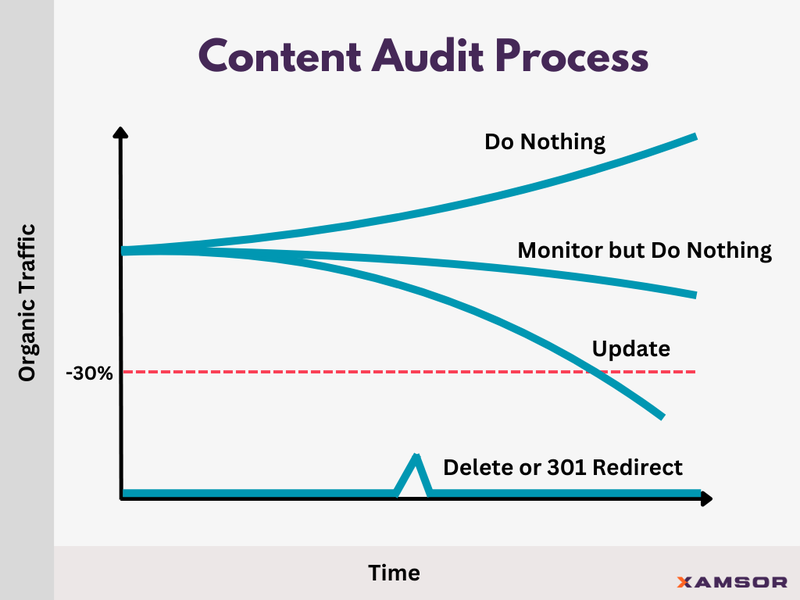
If a piece of content is older than six months, you can set it aside for our performance evaluation. Do nothing if it’s newer and published less than six months ago. It’s too early to evaluate performance.
Step Two: Analyze Content Performance
All content published longer than six months ago can move to this step. Our performance analysis is simple. Compare the total clicks in the last 90 days with the previous 90 days.
Content that has increased in performance or remained steady (less than 30% decline) can be left alone, but you should continue monitoring its performance.
Step Three: Check the Content’s Traffic
Now, you can take any poorly performing content and check its traffic over the last 12 months. If there is any type of traffic (organic, paid, social), it’s eligible for an update.
Content with zero traffic can be removed. In most cases, it is more efficient to eliminate this content than to try and refresh it.
Step Four: Determine Action Items
You should now have a list of content that needs an update. This includes content that has traffic but has seen a decline in performance over the past 90 days.
But how do you know what to update?
Below, we cover all elements of the content refresh process to keep in mind.
10 Ways to Update and Refresh Content
1. Improve Internal Linking
Outdated or poorly performing content can see an instant boost in performance with the addition of well-structured internal links.
First, you should create a logical site structure to guide your internal linking strategy. This can be done by hierarchically organizing your website with clear categories and subcategories.
That includes identity pillar pages and cornerstone content that are considered your most important articles.
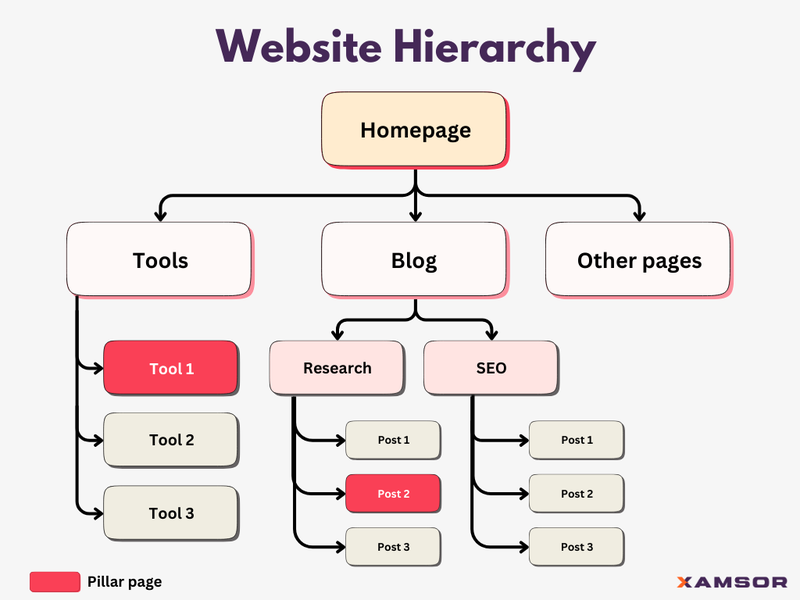
So, for example, you can take an already published guide on a broad topic such as “sustainable living” and add internal links from this cornerstone piece to your other blog posts that target relevant subtopics.
For instance, you might link to posts about “eco-friendly home improvements,” “zero-waste grocery shopping,” “renewable energy options for homeowners,” or “sustainable fashion choices.”
This internal linking structure helps establish your website as an authoritative source on sustainable living. What this does is signal to search engines that your site offers in-depth, valuable content on the topic.
Well-placed internal links can keep users on your site longer. They reduce bounce rates and increase engagement, sending positive signals to search engines about your content’s value.
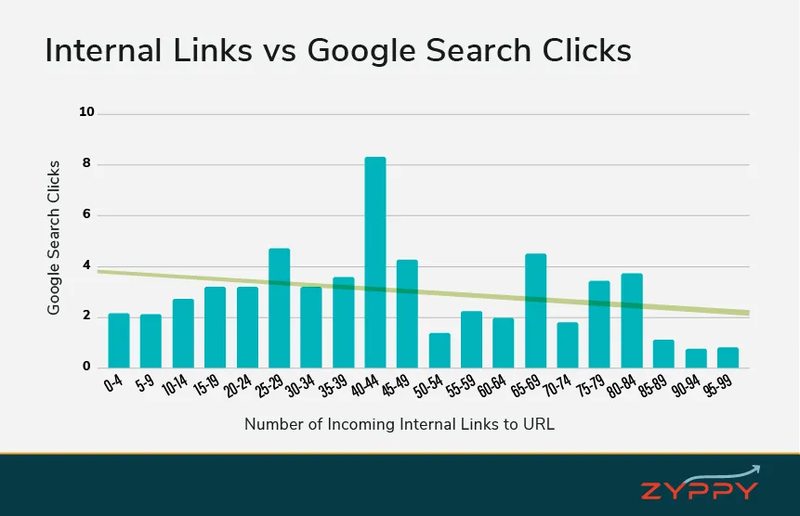
SeoClarity has published numerous case studies highlighting the impact of internal linking. Similarly, Zyppy SEO analyzed 23 million internal links across 1,800 websites to determine their impact.
The study found that URLs with 40-44 internal links received four times more clicks from Google Search compared to URLs with only 0-4 internal links.
Source: Zyppy SEO
However, they also found the effect reversed after 45-50 internal links. At this point, Google traffic started to decline as the number of internal links increased.
This suggests that while internal linking is crucial, striking the right balance and avoiding over-linking is equally important.
2. Revise Introductions
The next step is to reread, analyze, and revise your blog post’s introduction. A poorly crafted introduction that fails to grab readers’ attention can cause poor CTRs, low conversions, and declining traffic.
In our experience, the PPP (Preview, Proof, Preview) formula is how a blog post intro should look. Here’s what it means and how you can implement it when refreshing content:
- Preview: Briefly outline what the updated post will cover. This gives readers a quick snapshot of what to expect, helping them decide if the content is relevant to their needs.
- Proof: Provide evidence of your expertise or the post’s value. This could be a statistic, a brief mention of your credentials, or a quick success story that demonstrates why readers should trust you.
- Preview: Tease specific updates or new information. Highlight what’s fresh in your updated content, what the post will cover, or what they can expect to learn if they keep reading.
This structure helps set clear expectations and builds credibility right from the start.
 Source: Backlinko
The intro should be brief. Aim for 4-7 sentences. Brian Dean from Backlinko suggests limiting intros to under ten lines for maximum impact.
Another approach is PAS formula – Problem, Agitate, Solution.
You define the problem. You agitate it and explain its impact. Then, you reveal the solution.
 Source: Ahrefs
Implement these new introduction formats when updating content. It will hook readers, increase your on-page metrics, and keep readers engaged longer.
3. Implement New Frameworks and Templates
Refreshing your content isn’t just about updating facts and figures. It’s also about giving your content a structural makeover.
New frameworks can make your content more scannable and user-friendly. A study by Nielsen Norman Group found that 79% of web users scan pages instead of reading word-for-word.
Consider the Pillar-Cluster Model. This content strategy organizes a website’s content pages using a more deliberate and interconnected site architecture.
In this framework, a single “pillar” page acts as the central hub of content for an overarching topic, while multiple related content pages (the “cluster”) link back to the pillar page and to each other.
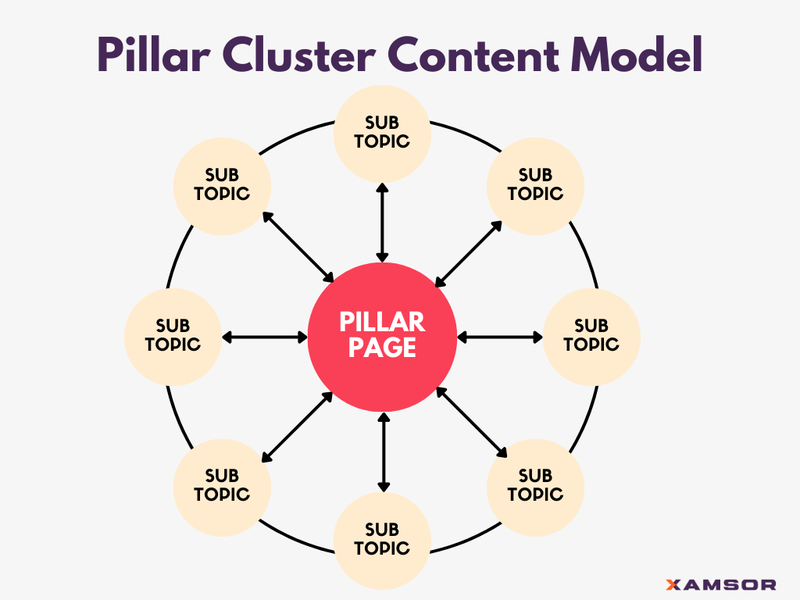
HubSpot pioneered this approach and reported a 50% increase in organic traffic after implementing this framework.
Templates work, too. How-to posts are evergreen content that performs well. CoSchedule suggests using formats like “How To [Keyword]: [Target Audience] Guide.”
List posts get more shares than other content types, according to BuzzSumo. Try “X Ways to [Achieve Desired Outcome]” or “X [Topic] Tips for [Target Audience].”
Choose frameworks and templates that align with your goals. Creating content with templates and frameworks in mind allows you to scale content production and boost your blog’s performance.
4. Refresh Content Publish Dates
Updating the publish dates of your content can be a creative (and sometimes necessary) tactic to signal freshness to both search engines and readers.
However, you should do more than simply change the dates and click publish. We recommend only updating the date when you’ve updated 5-10% of the page’s content in some capacity.
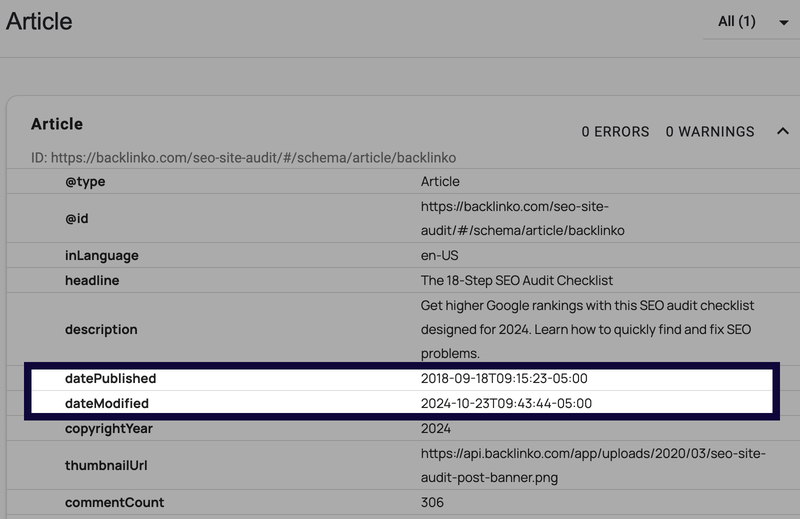 You can use schema.org to check and validate published and modified dates
For example, this can include adding new information, updating old statistics, or replacing outdated images.
It’s also helpful to use structured data with ‘datePublished’ and ‘dateModified’ markups to help search engines understand when the content was updated.
Simply changing the date without improving the content is considered “noise” by Google. This can be counterproductive and actually hurt your SEO rankings. Instead, prioritize adding value to your content rather than manipulating dates for perceived freshness.
5. Add New Research to Support Content Claims
Adding new research to support your content’s claims is a powerful way to breathe new life into old blog posts.
Referencing outdated studies can decrease content performance and make readers feel they’re not getting the most relevant information.
Instead, focus on finding the freshest data. Up-to-date stats and studies supporting your claims are more likely to grab readers’ attention.
Neil Patel tested this strategy and updated three pieces of content. Two of the three blogs saw a huge boost of 98% and 38% in click performance.
Remember, Google loves fresh content. By adding new research, you’re signaling that your post is current and valuable. This can give you a nice boost in search rankings.
6. Upgrade Graphics and Illustrations
Old, outdated graphics can make your content look stale. Refreshing these visuals will keep readers engaged and help boost your conversions.
And if your content has no visuals, adding them will do wonders for your rankings. Posts with images get 94% more views than those without them.
This is because people remember visuals better. In fact, we retain 65% of information when paired with a relevant image, compared to just 10% without.
Other than on-page user experience, graphics can help with rankings and traffic by boosting social shares. Content with relevant images gets more social media shares than imageless content.
And apparently, there is a science behind graphics and visuals when it comes to blog content.
According to a study conducted by Orbit Media, bloggers who add ten or more images to a post are nearly twice as likely to report “strong results” compared to those who use fewer images.
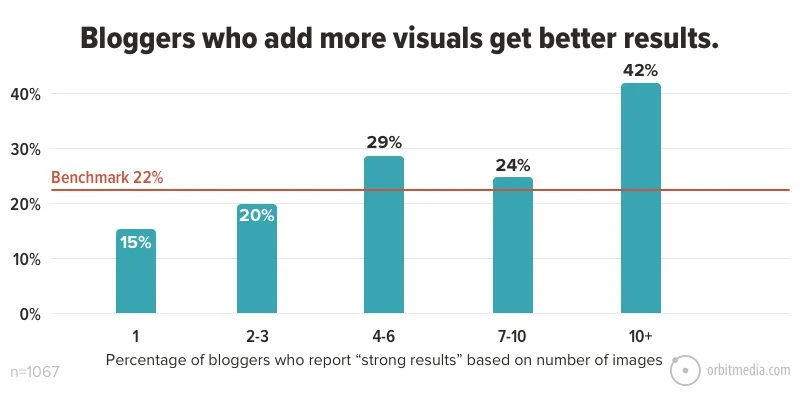
Source: Orbit Media
Not only should you focus on image quantity, but the data also suggests image frequency matters.
According to a Buzzsumo analysis of one million articles, articles with one image every 75-100 words were shared on social media roughly twice as often as articles with fewer images.
Orbit Media’s report also covers what types of images you should include in your blog posts.
- Charts and graphs: They contain a lot of data and can be compelling content assets on their own.
- People pictures: Posts with images of faces had a 160% increase in click-through rates compared to posts with pictures of objects.
- Quote images: These are popular on social media and easy to create with tools like Canva.
- Videos: Adding a video to a post can increase visitors’ time spent on the page by 400%.
- Infographics: These can present lots of information in a simple way and are popular for link-building campaigns.
No content update is complete without taking time for graphics and illustrations. Data suggests that investing time in creating and selecting the right visuals can significantly impact engagement, sharing, and overall content performance.
7. Adjust Text Structure and Formatting
Long paragraphs, run-on sentences, and big blocks of text are a turn-off for readers.
Tweaking your text structure and formatting during content updates can make a world of difference in keeping readers engaged.
Here are a few elements that matter and what you should be looking for during this content refresh step:
Readability is king. Breaking up your text makes it easier to scan. You can do this using bullet points and numbered lists. They’re great for breaking down complex ideas. Plus, they’re easy to skim.
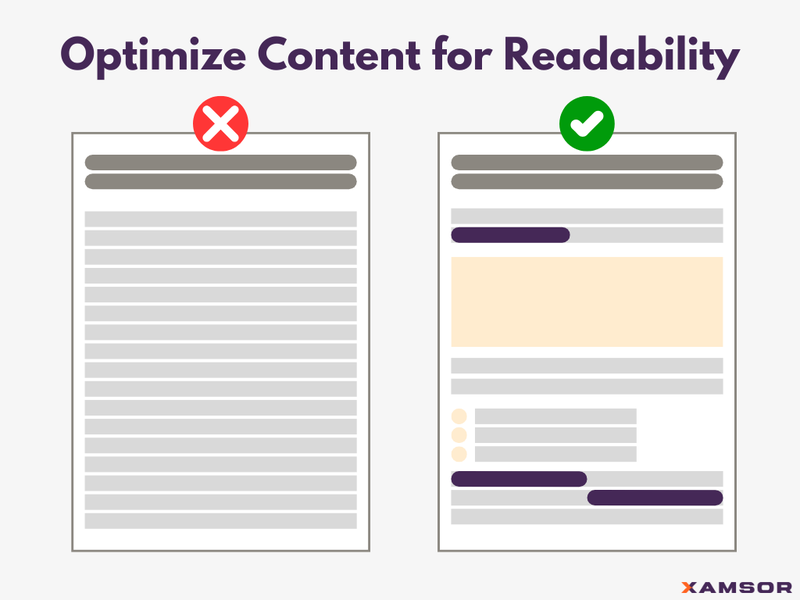
Subheadings are another way to improve formatting. They can also help you guide your reader through your post more effectively. They act as signposts, guiding readers through your content.
Don’t forget about white space. It gives your content room to breathe. A study by Wichita State University showed that proper use of white space increased comprehension by 20%.
Many blogs highlight key points and achieve great success. Use bold or italics to draw attention to important information, but don’t go overboard—too much can be distracting.
All of these text structure and formatting tips can improve content performance. Remember, the goal of an update is to make your content as easy to digest as possible.
8. Identify Content Gaps in Topic Clusters
Topic clusters effectively organize your blog content and boost your SEO performance. However, it’s entirely possible to miss topics and create content gaps.
When it’s time to update and refresh content, you can identify and fill these content gaps. A content gap analysis finds topics you haven’t covered that your audience is searching for.
How important are these clusters?
Travel Tractions published a case study highlighting the power of topic clusters. Notable growth points achieved include:
- Organic traffic grew from 5,560 to 16,671 monthly users in 6 months
- Organic keywords in Google SERPs increased from 9,883 to 23,466
- Acquired 40 featured snippets in 6 months
- Added only 50 posts (10% of total content) in one topical cluster
This is a perfect example of how focusing on a single topical cluster can significantly boost organic traffic and keyword rankings.
So, how can you spot and fill these gaps within your own content? Here are a few steps you can follow.
Start by mapping your content. Sketch out your topic clusters like a family tree. This visual helps you spot connections and gaps with more accuracy.
Next, dive into search intent. What are people really asking about your topic? Tools like AnswerThePublic can uncover long-tail topics you never would have considered covering before.
Don’t forget to spy on your competitors. What are they covering that you’re not? Ahrefs’ Content Gap tool is perfect for this detective work.
Now, look for missing pieces in your content puzzle. Are there obvious subtopics you’ve overlooked? Take those subtopics and turn them into new content pieces.
Lastly, think beyond text. Could a video or infographic better explain a complex topic? Mix up your content formats to cater to different learning styles.
9. Add FAQs or Supplementary Texts
Adding FAQs or supplementary texts to your content gives readers a bonus round of information. But it can also help boost your SEO game by ranking for Google People Also Ask (PAA) questions in the SERP.
By adding FAQs, you’re naturally incorporating long-tail keywords that people actually use when searching.
Moz found that 50% of search queries are four words or longer. That’s a lot of potential traffic you could be tapping into.
FAQs also improve user experience. HubSpot reports that 55% of visitors spend less than 15 seconds on a website. FAQs give quick answers, keeping people on your page longer. This reduced bounce rate signals to Google that your content is valuable.
Look at your customer service logs or social media comments to create effective FAQs. What questions do people ask most often? Those are gold for your FAQ section.
Use schema markup for your FAQs. This helps search engines understand your content better, potentially boosting your visibility in search results.
 Google can pick up FAQ schema to show in its search results. Source: Google Search Central
Keep your answers concise but informative. Remember, you’re aiming for that featured snippet. And don’t forget to interlink. Use your FAQs to guide visitors to other relevant pages on your site.
10. Update CTAs
CTAs are how you turn casual readers into engaged customers. But like anything else, CTAs can get stale. Refreshing them can give your conversion rates a serious boost.
Small changes, big results. HubSpot found that anchor text CTAs increased conversion rates by 121% compared to banner CTAs. That’s a massive difference from a simple tweak.
They also found some interesting results when testing personalized CTAs. Based on an analysis of more than 330,000 CTAs over six months, they perform 202% better than default or basic CTAs.
So, what should you do when updating CTAs to see results like this?
Start with the copy. Use action-oriented language. Unbounce found that using first-person phrasing (e.g., “Start my free trial” instead of “Start your free trial”) increased conversions by 90%.
Next, consider the placement of your CTAs. Grow and Convert analyzed CTA placement and found that posts with calls to action at the top and bottom of the page converted 300% better than posts with only one CTA at the bottom of the post.
Lastly, you should use urgency in your CTAs. Adding a sense of urgency or scarcity can increase conversions. CXL Institute found that adding a countdown timer to a CTA increased conversions by 147%.
All of these tips will increase conversions, but the key is to test, test, and test again. What works for your audience might surprise you. Use A/B testing to find the winning combination for your specific audience and content.
Conclusion
You’re now ready to tackle content updates with ten detailed strategies. From improving internal linking to implementing new frameworks, you have the toolkit for success.
Remember, content refreshing isn’t just about updating a few stats. It’s about strategically finding and addressing missing elements of existing blog posts to increase traffic.
Ready to take your content to the next level? Try our Content Audit Tool (CAT) to identify blog posts that need updating.

Max Roslyakov
Founder, Xamsor